
TABLE OF CONTENTS
Product Lifecycle Management (PLM) software centralizes product data to bring design, engineering, manufacturing, and procurement onto the same page. With a single source of accurate information, teams can work from the same set of files, reduce miscommunication, and keep projects moving smoothly from concept to production.
When integrating Siemens NX with a PLM system, your PLM must include Product Data Management (PDM) capabilities. PDM manages design files in order to prevent overwrites and maintain version control. This is key for maintaining data integrity throughout the development process.
Before choosing a system, it’s worth reviewing the differences between PDM and PLM to understand how each contributes to a complete NX workflow.

What is Siemens NX?
Siemens NX (formerly Unigraphics) is a software suite for product design and manufacturing that features integrated CAD, CAM, and CAE solutions. Engineers use Siemens NX to design components, which are then incorporated into the bill of materials (BOM). Pairing NX with a compatible PLM system helps ensure that design data moves smoothly into manufacturing, keeping the handoff from design to production efficient and accurate.
Researching a PLM for Siemens NX
For teams that use Siemens NX, the right PLM platform should integrate cleanly with NX, protect design data, and give engineers quick access to the information they need, without slowing them down. It’s also important to consider how well the tool handles PDM.
CAD-PLM Integration
Look for a PLM that directly integrates with Siemens NX. When engineers can manage PLM tasks without leaving CAD, they can stay focused on their workflow and avoid the productivity drop that comes with moving between tools.
Closed-Loop Release Process
A smooth handoff from design to release is critical. The release process that starts in NX should flow directly into the PLM’s change order and approval workflows. This closed loop gives teams control over file access, revision history, and release approvals. These are essential safeguards for complex assemblies and large data sets.
Bi-Directional Metadata Exchange
Your PLM should be able to send and receive key part data from NX. Metadata such as material, weight, and other specifications must stay synchronized across both systems so teams aren’t working from outdated or incomplete information.
PDM-CAD Integration
In conjunction with a PLM and NX, a PDM can enable hardware product design without the worry of overwriting work. Engineers can collaborate on design files without leaving the CAD application, ensuring complete control and ownership of intellectual property. Ideally, users should be able to directly leverage the full benefits of PDM and PLM within the CAD environment.
The 6 Best PLM Software for Siemens NX
Duro
Duro’s PLM software integrates directly with Siemens NX, giving hardware teams a connected environment for managing design files and product lifecycle data. Engineers can release revisions, transfer CAD data to a centralized hub, and keep part information accurate without breaking their workflow. Without leaving the PLM interface, teams can manage part numbers, generate BOMs, run change order processes, and give stakeholders real-time access to needed information.
Duro is cloud-native and built to keep projects moving quickly. Teams can get up and running without a dedicated IT rollout, and onboarding takes days rather than weeks or months. CAD data is stored on a secure, ITAR-compliant infrastructure, giving teams confidence in system performance and compliance with industry regulations.
Design without distraction with PDM
Duro offers a PDM solution that lets engineers work inside NX without worrying about overwriting files or losing track of revisions. Design data stays controlled and secure while multiple team members collaborate on the same project. Setup is quick and doesn’t require IT intervention, so teams can be up and running quickly. Files are stored on Duro’s cloud, ensuring that companies’ CAD data remains under their control.
Duro built a unique NX Add-In
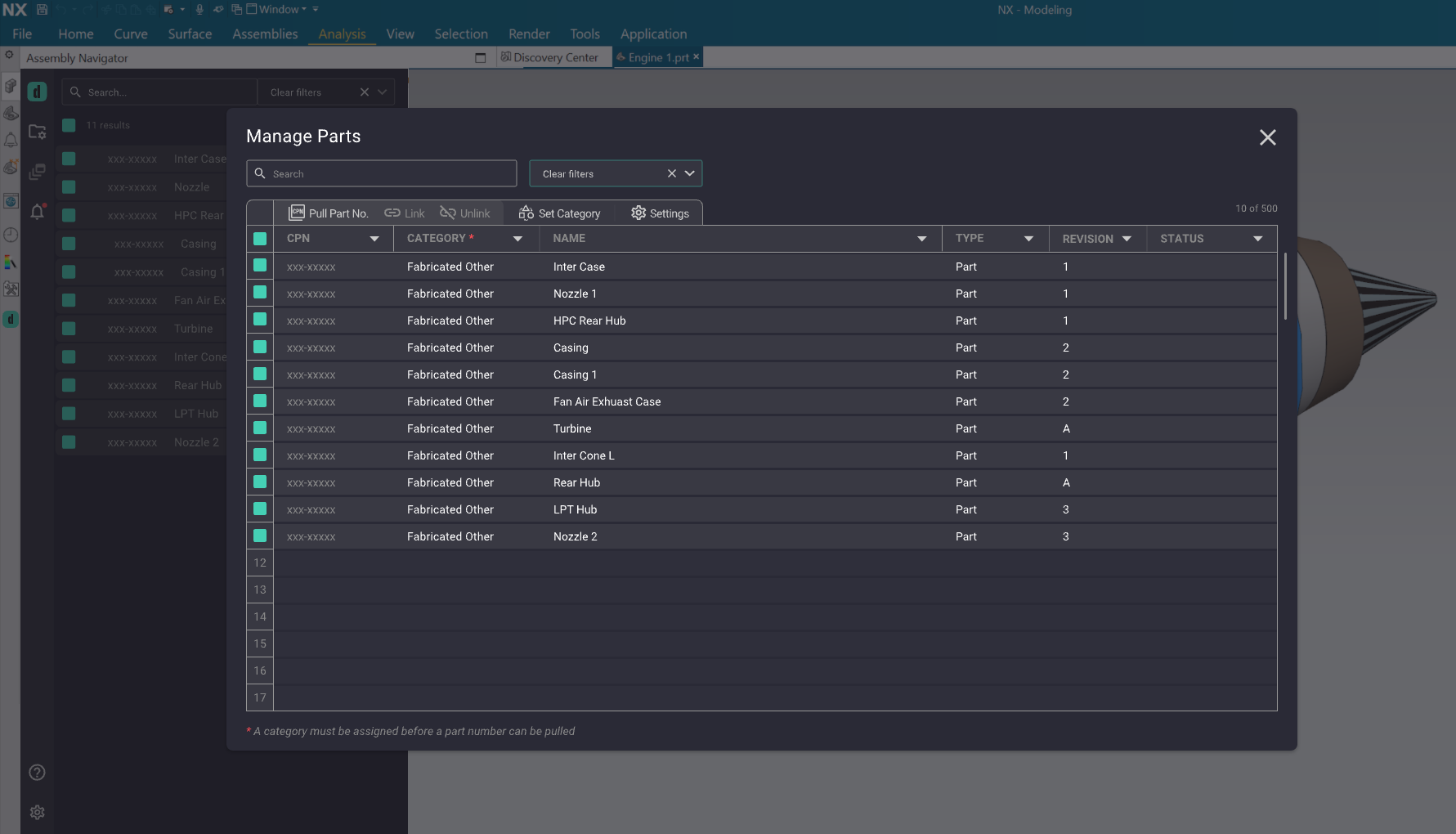
Duro’s latest PLM and NX mechanical CAD integration allows users to manage part numbers, update product status, release files, and quickly find parts and assemblies from within NX, so they don’t have to break their design flow. Since Duro’s integration works directly with Siemens NX, there’s no need for third-party connectors. That means fewer points of failure, less maintenance, and quicker adjustments when processes evolve. Duro’ simplifies processes and enhances efficiency with lightweight, agile workflows and a streamlined UI/UX.
Siemens Teamcenter
The Teamcenter integration with NX reduces product development cycle times by enhancing the NX environment for design collaboration. It provides seamless management, control, and security for NX data. Teamcenter PLM users can search for designs and manage data revisions, product configurations, and changes in single—or multi-site deployments.
OpenBOM
OpenBOM supports various CAD, PDM, PLM, ERP, and CRM integrations. It is a global collaborative SaaS platform that manages data, the product development lifecycle, and production planning and connects manufacturers with their customers, contractors, and suppliers. OpenBOM can extract BOM, CAD, and neutral geometry files tailored to customer requirements.
PTC WindChill
PTC Windchill gives NX users a broad set of tools for managing the entire product lifecycle, from initial design through production. Its integration with NX supports data management, version control, and team collaboration, helping engineering groups maintain accuracy and move designs through review and release without losing momentum.
ARAS
Aras Innovator is designed for companies handling complex data environments and offers NX integration as part of its platform. However, it depends on third-party connectors to link with NX, which can introduce extra steps in the setup process and increase long-term maintenance costs.
Enovia
ENOVIA offers users capabilities with integrations for Siemens NX. While it supports extensive customization, Enovia also relies on third-party connectors, which can lead to higher implementation costs and complexity compared to Duro’s native integration.
Choosing the Correct PLM for Siemens NX
Duro is the most effective PLM for teams using Siemens NX. Duro’s integration is built to work inside NX, so design and release activities happen in the same workspace. Duro also blends into daily workflows rather than forcing engineers to adapt to a separate system.
With Duro, workflows can be configured to match a company’s specific change management process, whether a simple sign-off for minor design tweaks or a multi-stage approval for regulated industries. Combining PLM and PDM in a single system means teams can see the design data alongside its downstream impacts, improving decision-making and reducing delays.
Choosing Duro means working with a PLM that’s quick to set up, easy to navigate, and built to handle design data without unnecessary complexity. Its Siemens NX integration gives hardware teams the tools to protect data accuracy and move projects forward without delays. And because the connection is built and supported entirely by Duro, there’s no need to manage extra vendors or maintain third-party connectors.
